



Did you know most businesses only take into account the obvious printing costs — paper and toner? The truth is, Australian businesses can spend 1% to 3% of annual revenue on printing-related costs such as toner, paper, maintenance, electricity, and IT support.
Most businesses skip the real cost.
This guide tells you what to look for before you invest. We cover printer sizes, paper standards, the questions to ask before buying, and which setup suits your business.
Why Printer Size Matters
Printer size matters. It is important to pay attention to the size of the printer because it affects the output of the team and the printing costs. Here are five things it controls:
- When you have the right machine, there is no delay in printing, and productivity does not decrease.
- Keep your requirements in mind because an A3 printer prints A4, but an A4 machine cannot print A3. Check the flexibility of the printer before the purchase.
- Larger machines may seem costlier to buy or lease, but they have a lower cost per page than a small device.
- Pick the right size. A compact A4 device might be all your small office needs.
- You can invest in one multipurpose machine that can scan, copy, print, and fax. It's easier to maintain and has fewer interruptions.
|
Your printer is costing more than you think. The average employee prints 10,000 pages a year at $725. Multiply that by your headcount. Most of that spend is never tracked — and never challenged. |
ISO Paper Sizes — What Australia Uses
Australia follows the ISO 216 standard. Just fold an A3 sheet in half, and you have an A4 in hand.
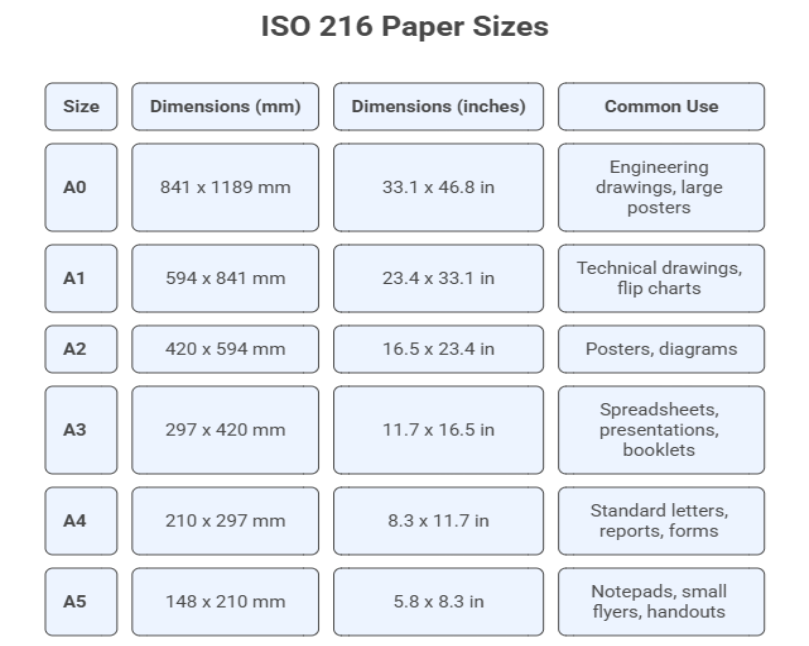
The above are the ISO 216 paper sizes in Australia.
Generally, daily office printing requires A4. A3 is used for spreadsheets with many columns, folded brochures, drawings, and display presentations. A5 is only used for notepads and small handouts.
|
Did you know? 45–65% of office printouts are thrown away the same day. The right printer setup — combined with a managed print policy — cuts that waste significantly and shows up directly on your running costs. |
The Four Printer Types — What Each One Does
A4 Printers
A4 printers handle standard office documents — letters, invoices, reports, and forms. They are affordable and laser-based — used for text-heavy output.
A3 Printers
A3 printers print both A3 and A4. They print presentations, large spreadsheets, folded brochures, and design work. They cost more initially, but deliver a lower cost per page at high volume.
Multifunction Printers (MFPs)
An MFP combines printing, copying, scanning, and faxing in one unit. It replaces several devices. MFPs come in A4 and A3 formats.
Compact Desktop Printers
These are small in size. They are used for entry-level work at home, in offices, at reception desks, or for occasional printing. They may be cheaper to buy, but are expensive to run.
Large-Format Printers
Large format printers are used for posters, signage, banners, and architectural plans. They are specialist machines for design studios and print shops.
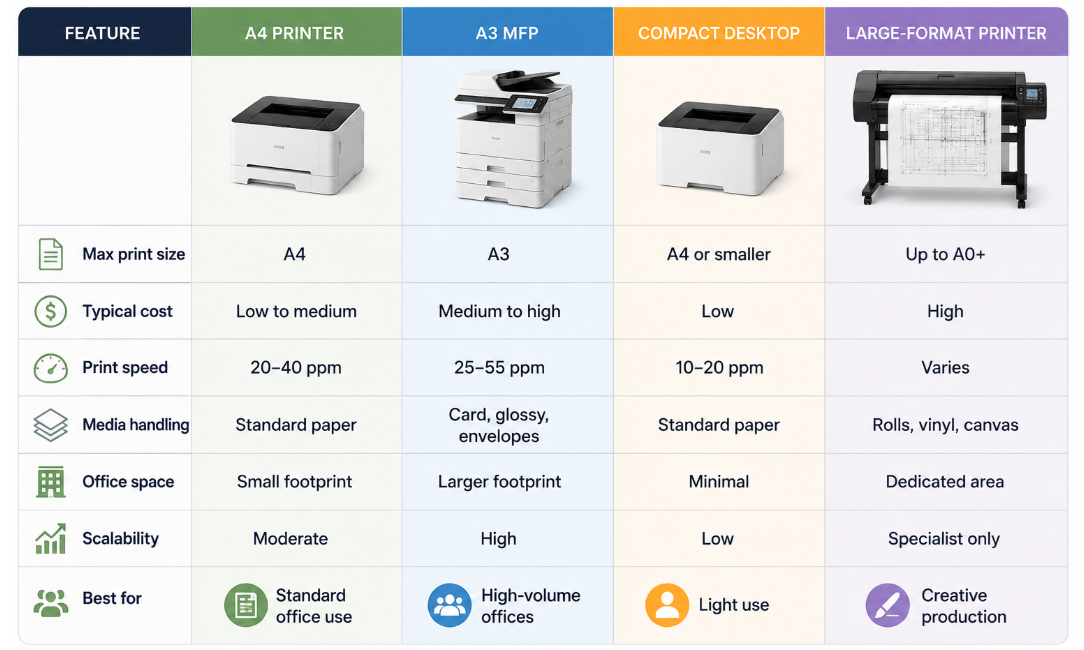 Office Printer Comparison
7 Things to Check Before You Buy
1. What is your monthly print volume?
Know your monthly requirements and your peak month needs. Pick a machine that can print at least 20% more than your typical volume. When you push a printer to print more than its capacity, you can easily wear out its components faster.
2. Do you need colour or monochrome prints?
Colour printing costs three to five times more per page than black-and-white. If you need to print more text, then use a monochrome laser printer. If you need marketing materials, then a colour MFP can be apt.
3. Do you need them all—scan, copy, and fax?
Buy an MFP if you need to scan, copy and fax. Separate scanning and copying devices mean more cost and clutter.
4. What is your choice of document?
If you use only standard A4 letters and invoices, then an A4 device is enough. Large spreadsheets, A3 presentations, folded brochures, and technical drawings need A3.
5. Do you want to secure your data?
Office printers store data, even while printing sensitive documents. Make sure to look for user authentication, secure print release, data encryption, and hard drive protection.
6. Warranty claim or service agreement?
Consumer printers rely on warranty claims and manufacturer support lines. Commercial machines, when purchased from authorised dealers, come with service agreements covering parts, labour, and toner.
7. How much space can you make?
Measure the spot before you make the purchase. There should be enough room for loading paper and clearing jams
Which Printer Suits Your Business?
|
Small businesses and startups — A4 MFP An A4 MFP is for small office needs: print, scan, copy, and fax in one compact unit. It fits on a desk. It costs less to lease and handles a few hundred to a couple of thousand pages a month. |
Medium businesses — A4 plus one central A3 MFP A central A3 MFP deals with high-volume, mixed-format printing for the main floor. This keeps queues short. An A4 is for quick prints. |
|
Large enterprises — multiple A3 MFPs Offices and departments with high-volume prints require multiple A3 MFPs managed through print management software. This will help you track usage. Managed print services bundle equipment, toner, and servicing into one monthly cost. |
Creative and design businesses — A3 colour MFP
Firms printing visuals, client presentations, and technical drawings require an A3 colour MFP. Often, design studios, marketing agencies, and architecture firms use them and pair them with a large-format printer for wide-format artwork. |
[Book a free site assessment with DDS Group →] We visit your office, assess your current setup, and give you a written recommendation. No obligation.
5 Mistakes Businesses Make When Buying a Printer
Mistake 1: Buying on price alone. Buying a $200 inkjet may seem like a bargain, but the $80 cartridge a month adds more. Add up the toner, servicing, and downtime — that is the real cost.
Mistake 2: Buying a machine too small for your workload. Every printer has a monthly page limit. When you push it past that, then the internal parts — drum, fuser, feed rollers — wear out ahead of schedule.
Mistake 3: Ignoring security. A document scanned on an office printer gets stored on its hard drive. That is a compliance problem. Secure print release and encrypted storage should be the bare minimum standard.
Mistake 4: Not asking what happens when it breaks. Consumer printers go back to the store or wait on a support line. DDS Group sends a technician on-site within four business hours — or donates $100 to a charity of your choice.
Mistake 5: Using a home printer in an office. Consumer printers are only for light use. If you use it for a busy office, it wears out within a year. Buy a machine built for the environment.
|
Did you know? |
How DDS Group Helps You Choose the Right Machine
DDS Group has been an authorised partner for Canon, Sharp, and HP in Australia.
We have been supplying and supporting office printing solutions in Victoria for more than 21 years. They offer:
Customised print solutions: DDS does not offer a generic package. It assesses your current setup and asks what frustrates you. Based on your pain point, it recommends a configuration built around your volume and document types.
Leasing and rental: You can lease a machine for over 60 months with a maintenance agreement covering toner, parts, and on-site service.
Managed Print Services (MPS): This service has your equipment, consumables, maintenance, repairs, and usage tracking on just one monthly invoice. Managed print services also cover automated toner replenishment and print management software — PaperCut and Uniflow.
Unlimited Flat Rate Plan: DDS charges only one fixed monthly cost. It covers equipment, parts, labour, toner, and IT support with no per-page fees and no overage charges. DDS estimates this saves businesses around 20% compared to standard billing. If a machine becomes unreliable, DDS replaces it with a device of equal or greater capability.
The $100 Machine Down Guarantee: If a printer is down due to a maintenance issue, DDS sends over a technician on-site within two business hours — and guarantees arrival within four. If the technician's visit misses that window, then DDS donates $100 to a charity of your choice.
The Bottom Line
A small accounts firm may need an A4 MFP. A busy marketing agency may need an A3 colour device with high monthly capacity. A 100-person business may require multiple managed machines.
Getting the format right (A4 vs A3) and the functions right (print only vs MFP) is vital. Everything else will fall in its right place.
DDS Group recommends the right printer and manages everything from delivery and installation through to toner and repairs. Their range covers A3 and A4 printers and photocopiers from Canon, Sharp, Epson, and HP — with leasing, rental, MPS, and the Unlimited Flat Rate Plan.
Stop overpaying for printing. DDS Group has managed office print for Victorian businesses for over 21 years. One call gets you a free consultation, a site assessment, and a written quote. [Talk to DDS Group Today]


