




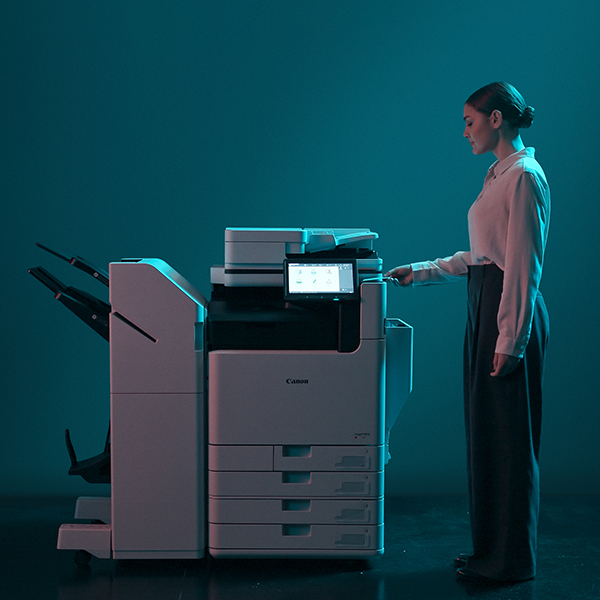
Multifunction printers, or MFPs for short, play an important role in supporting remote work and keeping teams productive. But with so many brands and models available, each offering different features, it can be challenging to identify the best option for your staff. That’s where DDS’ Managed Print Services come in. We can help you select an MFP that aligns with your organisation’s needs and workflow, and inform you on the best place to set it up. Scroll down to learn more!
Why the Placement of Your MFP Matters
Multifunction office printers are especially valuable in hybrid workplaces because they combine printing, scanning, copying and faxing in a single device, making it easier for remote and on-site employees to collaborate. They also offer significant cost benefits: purchasing and maintaining a single unit is typically cheaper than running separate devices for each function. As a result, businesses can reduce energy use, cut consumable costs, and save space in both home offices and shared work environments.
Now, some people may think that the placement of an office printer is pretty arbitrary and that it ultimately doesn’t matter where you put it. But in fact, the contrary is true; a well-placed printer can:
- Affect Office Workflow Efficiency
A well-positioned printer helps keep daily tasks moving smoothly by reducing unnecessary bottlenecks. - Reduce Walking Distance For You & Your Staff
Locating devices closer to the teams that use them most saves time and limits disruptions. - Minimise Queues & Congestion
Strategic placement helps avoid queues forming at high-traffic machines. - Prevent Overheating, Dust Damage, & Early Wear
Keeping printers away from heat sources, dust, and cramped spaces helps maintain performance and extend lifespan. - Improve Print Security & Compliance
Placing printers in supervised or access-controlled areas helps prevent sensitive print jobs from being viewed, lost, or collected by the wrong person.
Is It Safe to Put MFP on the Floor?
It’s generally not advisable to place a multifunction printer or copier directly on the floor. When a device sits at ground level, it is far more exposed to dust, dirt, and debris, which can work their way into vents and moving parts. This often results in more frequent cleaning, increased maintenance needs, and a greater risk of performance issues over time. The lower position can also make everyday use less ergonomic for staff, leading to awkward bending or lifting when accessing trays or replacing consumables.
If you have no other option, you can reduce the risks by taking a few precautionary steps:
- Use a mat or small platform to raise the device slightly and protect it from direct contact with dust and flooring.
- Clean the surrounding area more regularly to prevent particles from being drawn into the machine.
- Avoid placing it in high-traffic walkways, where dirt is constantly tracked through the space and the device is more likely to be bumped or obstructed.
- Ensure adequate ventilation on all sides, as airflow is essential for preventing heat buildup and keeping internal components functioning properly.
For long-term reliability and ease of use, the most effective solution is to invest in a dedicated MFP stand or cabinet. These units elevate the machine to a comfortable operating height, keep it steady, and often provide built-in storage for paper and supplies. Many MFP ranges offer optional base units specifically designed to lift the device for optimal ergonomics and performance in floor-standing setups.
Expert Tips for Smarter MFP Positioning
- Keep the Area Clean
Multifunction printers are highly sensitive devices, and even small amounts of dust or debris can interfere with sensors, rollers, or the paper path, leading to jams and inconsistent print quality. For this reason, the printer should be located in a part of the office that is less prone to foot traffic and airborne particles. The surrounding area should be regularly vacuumed or swept, and surfaces near the machine cleaned with an electrostatic cloth to prevent dust build-up. Paper trays should also be kept tidy and free from scraps or loose fibres to maintain smooth operation. - Maintain Proper Temperature & Humidity
MFPs operate most effectively in stable environmental conditions; typically between 18–24°C (65–75°F) with a relative humidity of 40–60%. Extremes of heat, cold, or moisture can cause paper to warp, curl, or pick up excess humidity, all of which increase the likelihood of misfeeds and print defects. To protect performance, avoid placing the machine close to windows, heaters, radiators, or air-conditioning vents. Maintaining a balanced environment also helps toner fuse correctly to the page, reducing smudging and improving overall print consistency. - Avoid Contaminants
Everyday office items can cause unexpected problems if they enter the machine. Food crumbs, drink spills, and even small objects like paper clips can obstruct mechanical parts or damage internal components. To minimise risk, beverages should never be placed near the device, and documents should be checked for staples or clips before scanning or copying. Sticky materials such as tape or adhesive notes should also be kept well away from the paper path to prevent residue from affecting rollers and sensors. - Balance Accessibility & Productivity
An MFP should be positioned so it is easy for staff to reach without interrupting nearby work. Locating the device close to the teams that rely on it most will help streamline daily tasks, but placing it too centrally can create unnecessary noise or movement in high-focus areas. The aim is to strike a balance where the printer is accessible enough to support workflow efficiency while still being situated in a location that does not disrupt concentration or contribute to general office clutter. - Allow Adequate Space & Ventilation
Printers need room to operate safely and efficiently. Sufficient clearance in front of the machine ensures that users can load paper, retrieve printouts, and access trays without obstruction. Space at the sides and back is equally important, as proper airflow prevents overheating and allows technicians to perform routine maintenance. Trays and drawers must be able to extend fully without hitting walls or furniture, maintaining smooth operation and reducing the likelihood of accidental damage. - Allow for Electrical & Network Requirements
Before settling on a final location, it is important to confirm that the area can support the printer’s electrical and connectivity needs. MFPs draw a considerable amount of power, so adequate outlets must be available to prevent overloading. Reliable network access is also essential for print, scan, and email functions. Cables should be arranged neatly and safely to avoid tangles or trip hazards, supporting both workplace safety and device uptime. - Minimise Noise Distractions
During heavy print runs, multifunction printers can produce noticeable noise, which may disrupt meetings, phone calls, or quiet work. To maintain a comfortable office environment, it is advisable to keep the device away from meeting rooms, reception areas, and designated quiet zones. A thoughtfully chosen location helps ensure that printing activity supports productivity rather than becoming a source of distraction.
How DDS’s Managed Print Services Support Optimal Placement
With DDS’s Managed Print Services (MPS), your print environment is assessed and configured to ensure every device is positioned and utilised for maximum efficiency and reliability.
- Professional Assessment for Effective MFP Placement & Distribution
Your workspace is reviewed to determine the ideal locations and number of devices, ensuring coverage that supports how your teams actually work. - Reduced Downtime Through Proactive Monitoring
Ongoing oversight allows issues to be detected early, keeping devices operational and reducing unexpected disruptions. - Improved Workflow Through Balanced Device Usage
Print volumes and user demand are analysed so tasks are spread evenly across your fleet, preventing bottlenecks at high-use machines. - Continuous Optimisation As Your Business Grows
Your setup is regularly reviewed and adjusted to match changes in staff, layout, or workflow. - Lower Costs Through More Efficient Device Utilisation
Smart placement and balanced usage help reduce energy use, consumables, and unnecessary hardware expenses.
Conclusion
Choosing the right multifunction printers—and placing them correctly—has a direct impact on workplace efficiency, reliability and running costs. DDS offers comprehensive managed print services, including expert device assessment, proactive monitoring, workflow optimisation, and ongoing adjustments as your business needs evolve. We also offer a wide range of high quality print products. For direct assistance, contact us today!


