




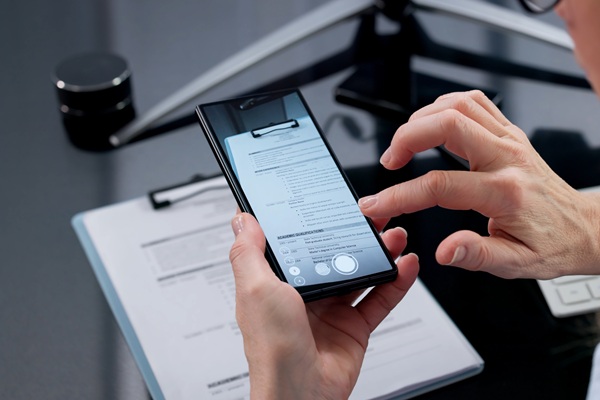
In today’s digital-first business environment, simply scanning documents into image files is no longer enough. Organisations need smarter ways to manage, search, and edit their documents efficiently. This is where OCR (Optical Character Recognition) technology becomes essential. When paired with a modern document scanner, OCR transforms static files into dynamic, usable data—saving time, improving productivity, and enhancing document workflows.
What Is OCR?
OCR, or Optical Character Recognition, is a technology that converts printed or handwritten text from scanned images into machine-readable and editable text. In simple terms, it allows your document scanner to “read” text from paper documents and turn it into digital content you can search, edit, and store efficiently.
Without OCR, scanned documents are essentially just images—like photos of text. With OCR, those same files become fully functional digital documents.
How OCR Works in a Document Scanner
When you scan a document using a document scanner, the OCR process typically follows these steps:
1. Image Capture
The scanner captures a high-resolution image of the document.
2. Text Detection
OCR software identifies areas in the image that contain text.
3. Character Recognition
The software analyses shapes and patterns to recognise letters, numbers, and symbols.
4. Conversion to Digital Text
The recognised text is converted into editable formats like Word, Excel, or searchable PDFs.
Advanced models, such as a Canon document scanner, often include built-in OCR software that performs these steps automatically, delivering ready-to-use files instantly.
Why OCR Matters in Modern Workflows
1. Makes Documents Searchable
One of the biggest advantages of OCR is the ability to search within documents. Instead of manually browsing through files, you can simply type keywords to find specific information.
For businesses dealing with contracts, invoices, or reports, this dramatically improves efficiency.
2. Saves Time and Reduces Manual Data Entry
Manual data entry is time-consuming and prone to errors. OCR eliminates the need to retype information by automatically extracting text from scanned documents.
For example, invoices scanned with a document scanner can be converted into editable data, ready for accounting systems.
3. Enables Easy Editing and Collaboration
OCR allows scanned files to be edited just like digital documents. Teams can update, share, and collaborate without recreating documents from scratch.
A high-quality Canon document scanner ensures accurate OCR results, making editing seamless and reliable.
4. Improves Document Organisation
OCR helps categorise and index documents based on their content. This makes it easier to organise files in digital systems and retrieve them quickly when needed.
Businesses can automate workflows such as:
- Sorting invoices by date or vendor
- Tagging legal documents by keywords
- Archiving records systematically
5. Supports Compliance and Record Keeping
Many industries require accurate record-keeping and easy access to documents for audits or compliance purposes. OCR ensures that documents are not only stored digitally but are also searchable and traceable.
Using a reliable document scanner with OCR capabilities helps businesses stay compliant while reducing physical storage needs.
6. Enhances Accessibility
OCR technology makes documents accessible to a wider audience, including individuals using screen readers. Text extracted through OCR can be read aloud or converted into other accessible formats.
Key Features to Look for in OCR-Enabled Document Scanners
When choosing a document scanner, OCR capability should be a top consideration. Here are the features that matter most:
- Accuracy: High OCR accuracy ensures fewer errors in text recognition. Premium devices like a Canon document scanner are known for delivering precise results, even with complex layouts.
- Speed: Fast OCR processing is essential for high-volume environments. Look for scanners that can process multiple pages quickly without compromising accuracy.
- Multi-Format Output: The ability to export files into formats like PDF, Word, Excel, and searchable PDFs is crucial for flexibility.
- Automatic Document Feeder (ADF): An ADF allows batch scanning, making it easier to handle large volumes of documents efficiently.
- Integration with Software Systems: Modern scanners integrate with document management systems, cloud platforms, and business applications for streamlined workflows.
OCR Use Cases Across Industries
1. Finance and Accounting
OCR helps digitise invoices, receipts, and financial records, reducing manual entry and improving accuracy.
2. Healthcare
Patient records can be scanned and converted into searchable digital files, improving access and compliance.
3. Legal Sector
Law firms benefit from OCR by making contracts and case files easily searchable.
4. Education
Schools and universities use OCR to digitise study materials and administrative documents.
5. Small Businesses
From receipts to contracts, OCR simplifies document management for small teams using a compact document scanner.
Why Choose a Canon Document Scanner for OCR?
A canon document scanner is widely recognised for its advanced OCR capabilities and reliability. These scanners are designed to handle a variety of document types, from standard paper to complex forms.
Key Advantages:
- High-speed scanning with accurate OCR output
- Advanced image processing for better text recognition
- Seamless integration with business applications
- User-friendly interfaces for easy operation
Whether you are scanning invoices, contracts, or reports, a Canon document scanner ensures that your documents are not just digitised—but fully usable.
Top Canon Document Scanners with OCR Technology
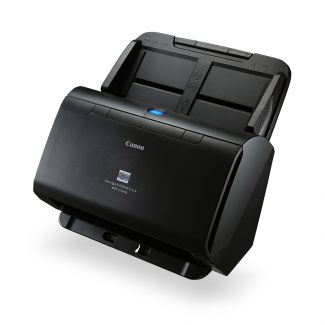
Canon DR-C240 Document Scanner
The Canon DR-C240 is a high-performance desktop scanner designed for busy offices handling large document volumes. Equipped with advanced OCR technology, it converts scanned files into searchable and editable digital documents, improving data accessibility and workflow efficiency. With image enhancement tools like Kofax VRS, it ensures higher OCR accuracy and clearer text recognition. Its ability to process mixed document types—including passports and long documents—makes it a versatile solution for businesses aiming to reduce manual data entry and streamline document management.
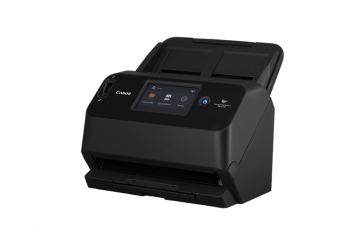
Canon DR-S150 Document Scanner
The Canon DR-S150 is a flexible, network-ready document scanner built for modern workplaces. Its integrated OCR functionality allows users to instantly convert paper documents into searchable PDFs or editable files, enabling faster information retrieval and improved collaboration. Combined with wireless connectivity and intuitive touchscreen operation, it simplifies document workflows across teams. The scanner’s intelligent processing ensures high OCR accuracy, helping businesses digitise records efficiently while reducing reliance on physical paperwork.
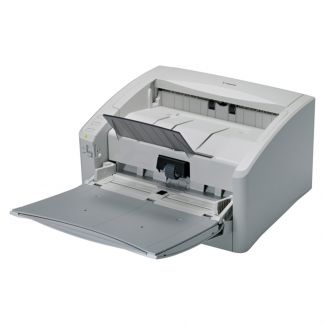
Canon DR-6010C Document Scanner
Designed for high-volume environments, the Canon DR-6010C delivers powerful scanning performance with built-in OCR capabilities. It transforms bulk paper documents into structured, searchable digital files, making it ideal for archiving, compliance, and data management tasks. Its advanced image processing enhances text clarity, ensuring reliable OCR results even with complex or varied documents. This scanner is a strong choice for organisations looking to automate document workflows, boost productivity, and maintain accurate digital records at scale.
Common OCR Challenges and How to Overcome Them
While OCR is powerful, it’s not without limitations. Here are some common challenges:
Poor Image Quality: Low-resolution scans can reduce OCR accuracy.
Solution: Use a high-quality document scanner with proper settings.
Complex Layouts: Tables, columns, and mixed formats can confuse OCR software.
Solution: Choose scanners with advanced OCR engines.
Handwritten Text: OCR struggles with handwriting.
Solution: Use specialised OCR tools designed for handwriting recognition.
Conclusion
OCR is no longer a luxury feature—it’s a necessity for efficient document management. By transforming scanned images into searchable, editable files, OCR unlocks the full potential of your document scanner.
Whether you’re a small business or a large enterprise, investing in an OCR-enabled solution—especially a reliable Canon document scanner—can significantly improve productivity, accuracy, and workflow efficiency. In a world where information is everything, OCR ensures that your documents are not just stored, but truly accessible and actionable.


